

MyRevolt App Complete Guide (2026): Every Feature Explained, From Geo-Fencing to OTA Updates
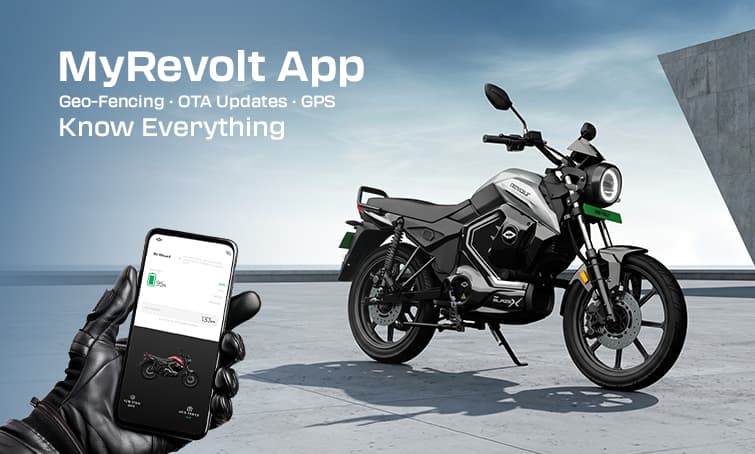
If you bought a Revolt electric bike, you did not just buy a motorcycle. You bought a connected machine that runs on electricity and talks to your phone. The MyRevolt app is the bridge between your hands and your bike — and most owners use only two or three of its features without realising what else sits inside it.
This guide covers every feature of the MyRevolt app as it stands in 2026, explains what each one does in plain terms, and tells you how to actually use it. Whether you picked up your bike last week or two years ago, there is something here you probably have not tried yet.
What Is the MyRevolt App and Which Bikes Support It?
The MyRevolt app is Revolt Motors' companion application for all its 4G-connected electric motorcycles. It is available on both Android (Google Play Store) and iOS (Apple App Store) and is free to download.
Models with full app connectivity:
Revolt RV400 BRZ
Revolt RV BlazeX
Models with partial app connectivity
Revolt RV1+
How to Set Up the MyRevolt App for the First Time
Getting the app paired with your bike takes about five minutes.
- Download MyRevolt from the Google Play Store or Apple App Store.
- Open the app and register using your mobile number — use the same number registered at the time of purchase.
- Enter the OTP sent to your number.
- Your bike should appear automatically once registration is verified. If it does not, tap "Add Vehicle" and enter your chassis number (VIN), which is on your registration certificate.
- Allow location permissions when prompted — these are required for live tracking and geo-fencing.
- Enable notifications so the app can alert you about geo-fence breaches, charging status and OTA updates.
Once connected, your bike's real-time status will appear on the home screen.
Feature-by-Feature Breakdown
1. Digital Remote Key (Swipe to Start / Stop)
This is the feature that surprises most new owners. Instead of a physical key, you can start and stop your Revolt bike directly from your phone.
On the app home screen, swipe the on-screen start button to the right to power the bike on. Swipe left to shut it off. The bike's systems power up — display, lights, motor controller — exactly as they would with a key turn.
When is this actually useful?
- You parked underground and cannot remember if you locked it
- Your key is misplaced and you need to move the bike
- You want to warm up the electronics before walking to the parking lot
One thing to note: Swipe to Start does not disengage the side-stand cutoff or any mechanical safety locks. The bike will not roll away on its own. You still need to be physically present to ride.
2. Live Bike Location (Real-Time GPS Tracking)
The app shows your bike's exact location on a map, updated continuously via the onboard 4G SIM. This works even when your phone is nowhere near the bike.
Open the app, tap the "Location" tab, and the map will show a pinpoint of where your bike currently is. You can zoom in to street level.
Practical Uses:
- Valet parking at a wedding — confirm the bike has not moved
- Lending the bike to a family member — keep an eye on where it goes
- Theft recovery — immediately share the live location with police
The tracking continues as long as the bike has battery charge. If the battery dies completely, the last known location is saved in the app.
3. Geo-Fencing: The Underused Security Feature
Geo-fencing lets you draw a virtual boundary on the map. If your bike crosses that boundary, the app sends you an instant alert on your phone.
How to Set it Up:
- Open the MyRevolt app and go to "Security" or "Geo-Fence" (the label varies slightly by app version).
- Tap "Set Geo-Fence."
- The map opens centred on your bike's current location. Drag the circle to your desired area and adjust the radius — typically 100 to 500 metres works well for home or office parking.
- Save the zone. From this point, any movement outside the circle triggers a push notification.
Practical Scenarios Where this Matters:
- Home Parking: Set a geo-fence around your building. If someone moves the bike even one lane over, you know immediately — before they get anywhere.
- Shared bike situations: If you lend the bike to someone with a specific route, a geo-fence around the city area they should stay in gives you instant visibility of deviations.
- Showroom or service centre: When your bike is in for service, a geo-fence around the service centre alerts you if the bike leaves before you authorise it.
A common mistake: Many owners set the geo-fence radius too small — 20 or 30 metres — and get false alerts every time the bike shifts slightly in parking. Set it to at least 100 metres to avoid notification fatigue.
5. Customisable Bike Sounds — All 4 Modes Explained
This is Revolt's most-talked-about feature, and it works entirely through the app. The RV400 and BlazeX have a built-in speaker system near the footpeg that generates artificial exhaust sound. The sound syncs with throttle input — rev the bike and the sound rises with it.
The four sound profiles:
How to change sounds:
- Open the app while the bike is on.
- Go to the "Sounds" section on the home screen.
- Tap any profile to switch. The change is instant — the speaker updates in real time.
- You can also select "Silent Mode" to ride with zero artificial sound.
The Safety Angle: Indian road safety guidelines are increasingly focused on EV noise for pedestrian awareness. Running a moderate sound profile (Revolt or Rebel) at low speeds in crowded areas is a genuine safety consideration, not just a gimmick.
7. Ride History and Trip Analytics
Every ride you complete is automatically logged in the "My Rides" section of the app. The data recorded for each trip includes:
- Total distance covered
- Duration of the ride
- Average and top speed
- Battery consumed (in percentage and estimated kWh)
- Energy cost of the ride (calculated at your local electricity rate)
- Fuel cost saved vs an equivalent petrol bike
- CO2 emissions saved (in kg)
- Equivalent trees planted based on carbon savings
The last three metrics are not just feel-good numbers — they are useful if your employer offers green commuting benefits or if you want to track your annual environmental contribution.
8. Battery Diagnostics: Reading Your Bike's Health in Real Time
The app provides a live diagnostics panel that shows the internal status of your bike's battery and electrical systems. This is the closest thing to having a mechanic's scan tool in your pocket.
What you can see:
- State of Charge (SoC): Current battery percentage
- Battery Temperature: Real-time temperature of the battery pack in degrees Celsius. Anything above 45°C during riding in peak summer should prompt you to switch to Eco mode and reduce speed.
- ECU Status: Whether the Electronic Control Unit is functioning normally or throwing any fault codes
- Motor Temperature: Particularly useful on long highway runs or hill climbs
- Charging Status: When plugged in, the app shows current charge rate, estimated time to full, and whether fast or standard charging is active
When to use diagnostics proactively:
- Before a long ride — check battery temperature and SoC
- After a monsoon ride — confirm no moisture-related fault codes
- If the bike behaves unusually (jerky throttle, reduced power) — check for ECU fault flags before visiting a service centre
10. OTA (Over-the-Air) Updates: What They Are and How They Work
This is one of Revolt's most technically significant features and the one least understood by owners. OTA updates allow Revolt's engineering team to push software improvements directly to your bike over the internet — no dealership visit required.
Think of it the same way you think of a smartphone software update — each OTA can meaningfully improve how your bike feels and behaves, even years after purchase.
What OTA cannot change: Hardware limitations. An OTA update cannot increase your motor's peak power beyond its rated output, add physical features, or change your battery capacity. It improves software efficiency within the existing hardware envelope.
11. Service Booking and Support
From the app's menu, you can raise a service request directly with Revolt's customer support. Tap "Support" or "Service Request," fill in your complaint or service type, and select your preferred date and dealership. A confirmation comes via SMS and app notification.
This is faster than calling the helpline and creates a written record of every service interaction tied to your bike's chassis number — useful for warranty claims.
Tips to Get the Most Out of the MyRevolt App
Set your geo-fence the day you bring the bike home. It takes two minutes and is the single most effective theft-deterrent feature available to you.
Check your ride analytics weekly, not just occasionally. Patterns emerge over time — you will see that your Monday commute uses 8 per cent more battery than Friday, likely because traffic is heavier and you use Sport mode more.
Enable OTA notifications and install updates promptly. Revolt regularly ships improvements. Bikes running the latest firmware consistently perform better than those running older software.
Use Silent Mode in tight areas like hospitals, residential lanes at night, or early-morning departures. The sound system is a great feature, but knowing when to switch it off makes you a considerate rider.
Screenshot your diagnostics panel before any service visit. Having a record of your battery temperature, ECU status and fault codes at the time of a problem makes the service centre conversation much more productive.
Final Word
The MyRevolt app is not a novelty feature. It is the operating system for your bike's connected layer — security, diagnostics, updates, and data all in one place. Most owners discover features months after purchase by accident. Now you know what is there and how to use it from day one.
If you have not set up geo-fencing, do it today. If you have never checked your ride analytics, open the app tonight. And the next time Revolt pushes an OTA update, install it — your bike will ride a little better for it.